


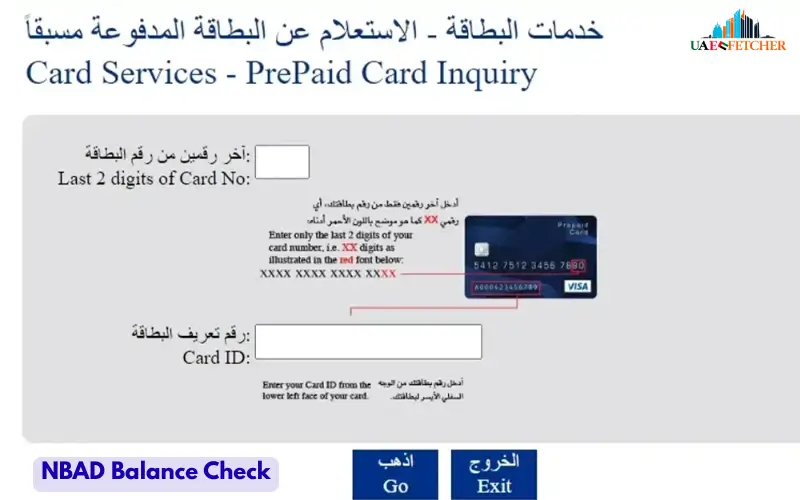
If you are looking for an NBAD balance inquiry, you can now check your old NBAD account through First Abu Dhabi Bank (FAB). National Bank of Abu Dhabi (NBAD) merged with First Gulf Bank (FGB) in 2017, and the new bank became First Abu Dhabi Bank.
You do not need to visit a branch just to check your balance. FAB customers can use the FAB Mobile app, online banking, ATMs, or customer support. The mobile app also lets customers view transactions, search account activity, download transaction history, and access electronic statements.
This guide explains the main ways to check your former NBAD or current FAB account balance, what to do when the balance looks wrong, and how to solve common access problems.
What Does NBAD Balance Inquiry Mean?
An NBAD balance inquiry simply means checking the money available in an account that was previously held with National Bank of Abu Dhabi.
Since NBAD became part of FAB, customers now use FAB’s banking services to manage those accounts. The name “NBAD balance inquiry” still appears in searches because many customers know the bank by its former name.
A balance check can help you see:
- Your account balance
- Available funds
- Recent deposits
- Withdrawals
- Transfers
- Card payments
- Other account transactions
If you want to know why your balance changed, checking your recent transactions can often give you the answer.
Is NBAD Still a Separate Bank?
No. NBAD is no longer a separate bank in the UAE.
First Gulf Bank and National Bank of Abu Dhabi completed their merger in 2017. The combined bank adopted the name First Abu Dhabi Bank (FAB), and FAB shares began trading in April 2017.
So, if you previously had an NBAD account, you should use FAB services when you need to check your account balance or manage your banking.
How to Check Your NBAD or FAB Balance
You have several ways to check your account balance.
| Method | What You Can Check | Best Use |
| FAB Mobile | Balance and transactions | Quick checks |
| FAB Online Banking | Balance and account activity | Computer users |
| FAB ATM | Account balance | Customers with a card |
| FAB Customer Support | Account help and verification | Access or account problems |
| Account Statement | Detailed account activity | Record keeping |
For a normal balance check, FAB Mobile is usually the easiest option because you can access your account from your phone.
Check Your FAB Balance Using the Mobile App
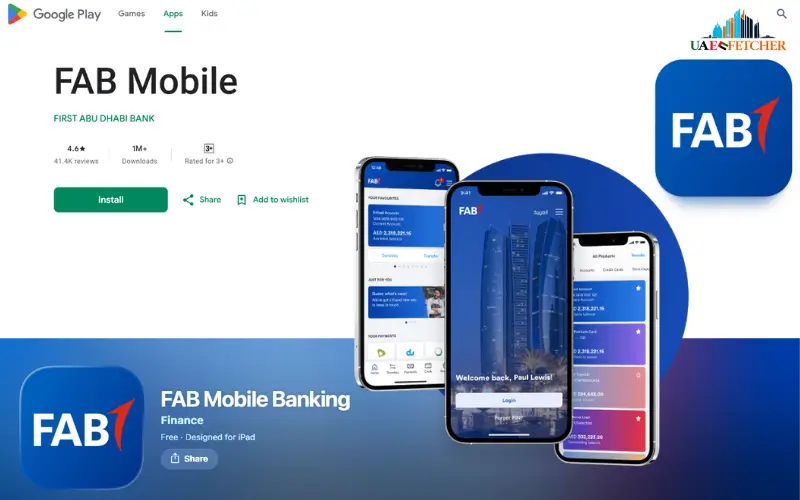
FAB Mobile gives customers access to their account balance and transaction details. The app also supports transaction searches, downloadable transaction history, and electronic statements.
Follow these steps:
- Open the FAB Mobile app.
- Sign in to your account.
- Open the accounts section.
- Select the account you want to check.
- View the balance shown on the screen.
- Open the transaction section if you want to see recent activity.
If you have more than one account, make sure you select the correct one before checking the balance.
What Can You Do in FAB Mobile?
The app provides more than a simple balance check. Depending on your account and available services, you can use it to:
- View account balances
- View transaction details
- Search transactions
- Download transaction history
- Access e-statements
- Share account or transaction details
- View card information
- Make account-related service requests
FAB’s current service-status page also lists account balance and transaction history through the mobile app as available services.
Check Your FAB Balance Through Online Banking
If you prefer using a computer, you can check your account through FAB Online Banking.
The general process is:
- Open the official FAB Online Banking service.
- Enter your Customer ID.
- Enter your password.
- Complete any security step requested by FAB.
- Open your account information.
- Check the displayed balance and recent transactions.
FAB requires a unique Customer ID and password for online banking. The bank also uses additional security checks for certain activities.
If you enter incorrect login information several times, FAB may lock online banking access. FAB says its online banking account locks after three unsuccessful attempts, after which customers need to contact customer care and complete verification.
Check Your Balance at a FAB ATM
A FAB ATM can help you check your account when you do not want to use mobile or online banking.
Follow these steps:
- Insert your FAB debit card.
- Enter your ATM PIN.
- Choose the balance inquiry option.
- Check the balance shown on the screen.
- Take a receipt if you need a record.
- Collect your card before leaving the ATM.
This option works well when you are already near a FAB ATM and have your debit card with you.
Must Visit: FAB ATM Balance Check: How to Check Your Account Balance
Do You Need to Visit a FAB Branch?
No. You normally do not need to visit a branch for a basic balance inquiry.
You can check your account through:
- FAB Mobile
- FAB Online Banking
- FAB ATM
- FAB customer support
A branch may become useful if you have a problem that you cannot solve through digital banking or customer support.
What Information Do You Need for a Balance Inquiry?
The information you need depends on the method you choose.
For mobile banking, you need access to your FAB Mobile account and the required login or security details.
For online banking, you normally need your:
- Customer ID
- Password
- Registered mobile device or other required security method
For an ATM balance check, you need:
- FAB debit card
- ATM PIN
If you contact customer support, FAB may ask you to confirm information to verify your identity before discussing your account.
Never give your banking password or PIN to another person. FAB also warns customers not to provide account details or OTPs to people who contact them through SMS, WhatsApp, or email while pretending to represent the bank.
NBAD Balance vs FAB Balance
You may see both terms while searching online, but they do not refer to two separate current banking systems.
| Term | What It Means |
| NBAD Balance | A term linked to the former National Bank of Abu Dhabi |
| FAB Balance | The balance shown through First Abu Dhabi Bank |
| Account Balance | The balance recorded in your bank account |
| Available Balance | The amount available for use after applicable transactions or restrictions |
| Transaction History | A record of money coming into and leaving your account |
If you were an NBAD customer before the merger, use FAB’s current banking channels to access your account.
What Is the Difference Between Account Balance and Available Balance?
Your account balance and available balance may not always show the same amount.
Your account balance reflects the amount recorded for the account. Your available balance can take account of transactions that have not fully posted or amounts that currently affect how much money you can use.
For example, a recent card purchase may still appear as a pending transaction. This can affect the amount available to spend.
If the two figures look different, check your recent transactions before assuming there is an error.
Why Is My FAB Balance Different From What I Expected?
A balance can change after several types of account activity.
Common reasons include:
- Recent debit card purchases
- Pending card transactions
- Cash withdrawals
- Bank transfers
- Deposits
- Bill payments
- Direct debits
- Account charges
- Recent refunds
- Other pending transactions
Start by checking your transaction history. Look for activity that matches the difference between the balance you expected and the balance shown in your account.
If you still cannot explain the difference, contact FAB through an official customer service channel.
How to Check Your FAB Transaction History
Your transaction history can help you understand exactly what happened to your account balance.
FAB Mobile lets customers view transaction details, search transactions, and download transaction history. You can also use electronic statements when you need a longer record of your account activity.
When checking your transactions, look at:
- Date of the transaction
- Transaction amount
- Payment or withdrawal
- Deposit
- Transfer
- Card purchase
- Refund
- Other account activity
Regularly reviewing transactions can also help you spot an unfamiliar payment quickly.
What If You Cannot Check Your FAB Balance?
If the app or online banking service does not show your balance, try the following steps:
- Check your internet connection.
- Close and reopen the app.
- Make sure you use the correct login details.
- Check whether the app needs an update.
- Try FAB Online Banking.
- Use a FAB ATM if you have your debit card.
- Contact FAB customer support if you still cannot access the account.
Do not keep guessing your password if you have already entered it incorrectly. FAB may lock online banking access after three failed attempts.
What If Your FAB Account Balance Looks Wrong?
Do not assume that the bank made an error just because the amount looks different.
First, check your recent transactions and look for:
- A card purchase you made recently
- A pending payment
- A cash withdrawal
- A transfer
- A bill payment
- A deposit that has not appeared as expected
- A bank charge
- A refund or reversed transaction
If you cannot identify the transaction, contact FAB and ask the bank to review the account activity.
If you see a transaction that you did not make, report it quickly rather than waiting for the next statement.
NBAD Balance Inquiry for Different FAB Accounts
Former NBAD customers may have different types of accounts. The balance-checking method can depend on the product you hold.
Savings Account
If you have a FAB savings account, you can use the available digital banking services to check the account balance and review transactions.
Current Account
A FAB current account can also be managed through available digital banking channels. You can check the balance and review account activity without visiting a branch for a basic inquiry.
Salary Account
If your salary goes directly into your FAB account, you can use the same account access methods to check whether your salary has arrived and review other account transactions.
Ratibi Card
Ratibi customers should use the balance-checking method that applies to their specific card and account arrangement. If you are unsure which service you should use, contact FAB for account-specific assistance.
Credit Card
A credit card does not work like a normal savings or current account. If you want to check your credit card balance, open the credit card section of your FAB banking service and review the outstanding amount and available credit.
Which FAB Balance Check Method Should You Use?
The right method depends on what you need.
| Method | Speed | What You Need | Best For |
| FAB Mobile | Fast | Smartphone and account access | Daily checks |
| Online Banking | Fast | Computer and login details | Detailed account access |
| FAB ATM | Fast | Debit card and PIN | Quick checks outside home |
| Customer Support | Depends on wait time | Identity verification | Account problems |
| Statement | Depends on access | Banking access | Detailed records |
For a simple balance check, FAB Mobile is a practical choice. If you have no access to the app, an ATM or online banking can give you another way to view your account.
FAB Balance Inquiry Security Tips
Your bank balance and account information are private. Use official FAB services whenever you check or manage your account.
Keep these points in mind:
- Never give your ATM PIN to anyone.
- Never share your online banking password.
- Do not share an OTP with another person.
- Do not enter banking details on an unknown website.
- Avoid clicking suspicious banking links.
- Keep your phone protected with a screen lock.
- Keep your banking app updated.
- Check account notifications and transactions regularly.
- Contact FAB if you notice suspicious activity.
FAB specifically warns customers not to provide personal, card, or account details in response to suspicious SMS messages, emails, WhatsApp messages, or calls.
FAB’s Current Digital Security
FAB has added security measures to its mobile and online banking services. Its current digital authentication system can use the FAB Mobile app to confirm certain online banking activities instead of relying only on traditional SMS or email OTP methods.
This means your banking experience may look different from older NBAD instructions found online.
If an old article tells you to follow an NBAD login process that no longer matches the current FAB service, use the current FAB banking instructions instead.
Former NBAD Customers: What Should You Do?
If you used NBAD before 2017, you do not need to search for a separate NBAD banking service today.
The merger created First Abu Dhabi Bank, and FAB now provides the current banking services for former NBAD customers.
If you have not accessed your account for a long time, you cannot remember your login details, or you have another account problem, contact FAB through an official support channel.
Can You Check Your FAB Balance While Traveling?
You can use digital banking while traveling if you have access to your account and the required security checks.
Before signing in outside the UAE, take a few basic precautions:
- Use a trusted internet connection.
- Avoid public computers for banking.
- Keep your registered phone available.
- Do not save banking passwords on shared devices.
- Check your transactions after making important payments.
If you lose your phone while traveling, take steps to protect your mobile number and banking access as soon as possible.
What If You Forgot Your FAB Login Details?
Do not keep trying random passwords.
Use the available FAB account recovery options or contact FAB customer support. The bank may require identity verification before restoring access to your account.
FAB’s security information confirms that customer service verifies identity before handling account-related activities.
If your online banking access becomes locked after failed attempts, contact FAB rather than creating repeated login attempts.
How to Contact FAB for Balance Problems
If you cannot check your balance through the app, online banking, or an ATM, FAB customer support can help with account-related problems after identity verification.
FAB currently lists 600 52 5500 for customers in the UAE and +971 2 681 1511 for customers outside the UAE.
Use an official FAB contact channel when you need help. Do not trust a phone number sent to you through an unexpected SMS, WhatsApp message, or email.
Final Tips for NBAD Balance Inquiry
The main point is simple: NBAD is now part of First Abu Dhabi Bank (FAB). If you search for an NBAD balance inquiry today, use FAB’s current banking services rather than looking for a separate NBAD system.
For a quick check, FAB Mobile gives you access to your balance and transaction details. If you cannot use the app, you can try online banking or a FAB ATM. If your balance does not match your records, check recent transactions first and contact FAB if you still cannot find the reason.
Protect your Customer ID, password, card details, PIN, and security codes. FAB warns customers not to share account information or OTPs with people who contact them unexpectedly.
Frequently Asked Questions
1. How can I check my NBAD balance?
You can check an old NBAD account through current FAB banking services. Use FAB Mobile, Online Banking, a FAB ATM, or customer support.
2. Is NBAD still a separate bank?
No. NBAD merged with First Gulf Bank in 2017, creating First Abu Dhabi Bank (FAB).
3. How can I check my FAB balance online?
Sign in to FAB Online Banking, open your account information, and check the balance shown for your account.
4. Can I check my FAB balance through the mobile app?
Yes. FAB Mobile lets customers view account balances and transaction details.
5. Can I check my FAB balance at an ATM?
Yes. Insert your FAB debit card, enter your PIN, and select the balance inquiry option.
6. Do I need to visit a FAB branch to check my balance?
No. You can normally check your balance through FAB Mobile, Online Banking, an ATM, or customer support.
7. Why is my available balance different from my account balance?
Pending transactions, recent payments, transfers, and other account activity can affect the amount available for use.
8. What should I do if I cannot access my FAB account?
Check your internet connection and login details first. If you still cannot access the account, use another FAB banking channel or contact customer support.
9. Can former NBAD customers still check their accounts?
Yes. Former NBAD customers now use FAB banking services to access their eligible accounts and check their balances.
10. How can I check my FAB transaction history?
You can check transaction activity through FAB Mobile and other available banking services. FAB Mobile also supports transaction searches and downloadable transaction history.
11. What should I do if I see an unknown transaction?
Review the transaction details first. If you did not make or authorize the transaction, contact FAB through an official support channel as soon as possible.
12. Can I check my old NBAD balance without visiting a branch?
Yes. You can use FAB Mobile, Online Banking, or a FAB ATM for a balance check, depending on your account and available access.
