Managing your mobile account becomes much easier when you know how to monitor your remaining balance, internet data, call minutes, and active packages. Whether you are using a prepaid SIM or a postpaid connection, Etisalat provides several quick and convenient ways to access your account information in real time.
Many users search for terms like how to check Etisalat balance, how to check Etisalat data balance, and Etisalat balance check code because they want fast and accurate methods without contacting customer support. Fortunately, Etisalat offers multiple balance inquiry solutions, including USSD codes, SMS services, the My Etisalat UAE app, customer care support, and online account management tools.
Etisalat Balance Check Methods Overview
Etisalat allows customers to check their account details using different methods depending on their preference and device availability.
| Method | Purpose | Internet Required |
| USSD Code | Instant balance inquiry | No |
| My Etisalat UAE App | Detailed account management | Yes |
| SMS Service | Data balance and account details | No |
| Customer Care | Manual support assistance | No |
| Official Website | Online account access | Yes |
Each method is designed to help subscribers quickly monitor their mobile usage, remaining credit, and package validity.
Etisalat Balance Check Code
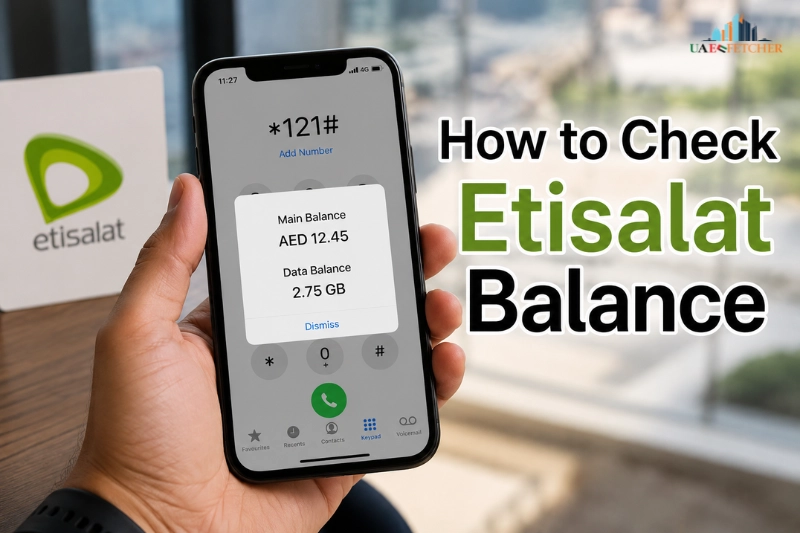
The easiest and fastest way to check your remaining mobile balance is through the official Etisalat balance check code. This method works on all smartphones and basic mobile phones without requiring internet access.
Main Etisalat Balance Inquiry Code
| Service | USSD Code |
| Main balance check | *121# |
| Data balance check | *170# |
| Recharge balance | 120Recharge Number# |
| Customer support | 101 |
These telecom shortcodes connect directly with the Etisalat network and provide instant account information.
How to Check Etisalat Balance Using USSD Code
If you want a quick balance inquiry, follow these simple steps:
- Open the mobile dialer on your phone.
- Dial *121#
- Press the call button.
- Wait a few seconds.
- Your remaining balance will appear on the screen.
This is one of the most widely used methods in the UAE because it is fast, reliable, and completely free for Etisalat subscribers.
Many users searching for how to check balance in Etisalat prefer this method because it works even without Wi-Fi or mobile data.
How to Check Etisalat Data Balance
Monitoring internet usage has become extremely important due to streaming platforms, video calls, social media applications, and online gaming. Etisalat allows users to track their remaining mobile data instantly.
Etisalat Data Balance Check Code
To check your remaining internet package:
- Open your phone dialer.
- Dial *170#
- Press the call button.
- Wait for the telecom response.
- You will receive your remaining data details through SMS or popup notification.
The response may include:
- Remaining MBs or GBs
- Package validity
- Expiry date
- Active internet bundle details
This method is especially useful for prepaid users who want to avoid unexpected internet charges.
Check Etisalat Data Balance Through SMS
Etisalat also supports SMS-based data balance inquiry services.
| Service | SMS Method |
| Data balance inquiry | Send “Data” to 1010 |
After sending the message, the network automatically provides information about your remaining internet balance and package status.
SMS inquiry methods are useful when USSD services are temporarily unavailable.
Why Monitoring Data Usage Is Important
Many mobile applications consume internet data in the background even when not actively used. Regularly checking your remaining internet balance helps users:
- Prevent sudden data exhaustion
- Avoid additional browsing charges
- Monitor streaming usage
- Track daily internet consumption
- Manage monthly package limits
This is particularly important for users with limited prepaid internet plans.
How to Check Balance in Etisalat Using My Etisalat UAE App
The official My Etisalat UAE application provides a complete account management experience for both prepaid and postpaid users.
Downloading the My Etisalat UAE App
The application is available for:
- Android devices
- iPhones and iPads
Users can download the app from official app stores and log in using their Etisalat mobile number.
My Etisalat UAE App: www.etisalat.ae/en/c/mobile/plans/my-etisalat-uae-app.html
Features Available in the App
| Feature | Function |
| Balance tracking | View remaining mobile credit |
| Data monitoring | Track internet usage |
| Recharge services | Add balance instantly |
| Bill payment | Pay postpaid invoices |
| Package subscriptions | Activate internet bundles |
| Usage history | Monitor previous activity |
| Notifications | Receive low balance alerts |
Unlike traditional USSD codes, the app offers detailed visual reports and real-time account analytics.
Benefits of Using the Etisalat Mobile App
The app is useful for users who want more than simple balance inquiry services.
Real-Time Account Monitoring
Subscribers can track balance updates instantly without repeatedly dialing USSD codes.
Better Internet Usage Tracking
Users can monitor daily data consumption and identify applications consuming excessive internet bandwidth.
Easy Recharge and Payments
Both prepaid recharge and postpaid bill payment options are integrated into the app.
Package Management
The application allows users to activate, renew, or cancel mobile packages without visiting physical service centers.
How to Recharge Etisalat Balance
In addition to checking the balance, users frequently search for methods to recharge Etisalat account quickly.
Etisalat offers several recharge options for prepaid users.
Recharge Etisalat Balance Using USSD Code
One of the fastest recharge methods is through recharge vouchers.
Recharge Steps
- Purchase an Etisalat recharge card.
- Open the dialer.
- Dial:
*120*Recharge Number#
- Press the call button.
- Wait for confirmation SMS.
Your account balance will update immediately after successful processing.
Recharge Through the My Etisalat UAE App
Users can also recharge digitally through the official application.
Steps Include:
- Open the app
- Select the recharge option
- Enter recharge amount
- Complete payment using debit or credit card
This method is more convenient for users who prefer online transactions.
Recharge Through the Official Website
Etisalat also provides online recharge services through its official website.
Etisalat UAE Recharge Services: www.etisalat.ae/en/prepaid-top-up.html
Users simply enter:
- Mobile number
- Recharge amount
- Payment details
The balance is updated instantly after successful payment verification.
How to Check Etisalat Prepaid Balance
Prepaid customers usually need frequent balance monitoring because services stop automatically once the balance becomes insufficient.
Information Available in Prepaid Balance Inquiry
When checking prepaid balance, users may see:
| Information Type | Details |
| Main balance | Available mobile credit |
| Bonus balance | Promotional credit |
| Remaining data | Internet package balance |
| Free minutes | Local or international minutes |
| Package validity | Expiry information |
This helps subscribers manage their mobile usage more effectively.
Common Reasons for Fast Balance Deduction
Some users experience rapid balance reduction without understanding the reason.
Possible causes include:
- Background app activity
- Auto-renewal subscriptions
- Roaming charges
- Video streaming
- Expired internet packages
- Third-party premium services
Regular balance checking helps detect unusual usage early.
How to Check Etisalat Postpaid Balance
Postpaid customers usually monitor their monthly usage instead of prepaid credit.
Postpaid Account Information
Etisalat postpaid subscribers can check:
- Outstanding bill amount
- Monthly data usage
- Remaining call minutes
- SMS usage
- Roaming charges
- Credit limit information
The My Etisalat UAE app provides the most detailed postpaid account analytics.
Why Postpaid Users Should Monitor Usage
Although postpaid plans provide larger allowances, excessive usage may lead to additional charges. Regular monitoring helps users:
- Stay within package limits
- Avoid unexpected bills
- Monitor roaming consumption
- Track internet usage trends
This becomes especially important for business users and heavy internet consumers.
How to Set Up Etisalat Balance Notifications and Alerts
Etisalat allows subscribers to activate alerts and notifications for better account management.
Types of Alerts Available
Users may receive notifications for:
- Low balance warnings
- Internet usage limits
- Package expiry reminders
- Recharge confirmations
- Monthly billing alerts
These notifications help prevent service interruptions and unexpected charges.
Enable Alerts Through the Mobile App
To activate notifications:
- Open the My Etisalat UAE app.
- Log into your account.
- Navigate to notification settings.
- Select desired alerts.
- Save your preferences.
This feature is especially useful for users with limited prepaid balances or monthly data packages.
Etisalat Customer Care for Balance Inquiry
Subscribers who face technical issues can contact customer support directly.
| Support Service | Contact Number |
| Etisalat customer care | 101 |
Customer support representatives can assist with:
- Balance inquiry problems
- Recharge issues
- Data package activation
- Billing complaints
- SIM registration problems
Although customer support is helpful, self-service methods like USSD and mobile apps are usually faster.
Common Etisalat Balance Check Problems and Solutions
Users occasionally encounter issues while checking balance or monitoring data usage.
USSD Code Not Working
This issue may occur because of:
- Temporary network problems
- Incorrect dialing format
- SIM card registration issues
- Weak signal strength
Restarting the device or retrying after some time usually resolves the issue.
Data Balance Not Updating
Sometimes internet usage information updates slowly due to:
- Network synchronization delays
- Recent package activation
- Cached account information
- Ongoing telecom maintenance
Most data balances refresh automatically after a short period.
Recharge Successful but Balance Missing
In some cases, users receive recharge confirmation but do not see updated balance immediately.
Possible reasons include:
- Delayed processing
- Incorrect recharge entry
- Temporary system updates
If the issue continues, contacting customer support is recommended.
Unable to Access the My Etisalat UAE App
App-related problems may occur because of:
- Outdated application version
- Poor internet connection
- Incorrect login credentials
- Device compatibility issues
Updating the app usually fixes most problems.
Tips to Manage Etisalat Balance Efficiently
Checking balance regularly is important, but smart usage habits can help users control expenses even better.
Monitor Background Data Usage
Applications running silently in the background can consume significant internet data.
Users should:
- Disable unnecessary background activity
- Restrict automatic app updates
- Use Wi-Fi whenever possible
- Monitor video streaming quality
These small adjustments can greatly reduce internet consumption.
Subscribe to Suitable Packages
Choosing the correct package according to personal usage patterns is extremely important.
For example:
- Heavy streaming users may require unlimited data plans
- Casual users may save money with smaller prepaid bundles
- International callers may benefit from special calling packages
Selecting appropriate plans improves overall account management.
Enable Auto Alerts
Balance notifications help users stay informed about:
- Low mobile credit
- Package expiry
- High internet usage
- Monthly billing cycles
This prevents unexpected interruptions and improves usage control.
Conclusion
Checking your mobile account regularly helps you maintain better control over your telecom services, internet usage, and recharge expenses. Whether you are using prepaid or postpaid services, Etisalat provides multiple convenient balance inquiry methods for UAE subscribers.
For users searching for how to check Etisalat balance, the fastest solution remains the USSD balance inquiry code. Similarly, users looking for how to check Etisalat data balance can monitor their remaining internet package through USSD services, SMS inquiry methods, or the My Etisalat UAE application.
With accurate balance monitoring, recharge management, usage alerts, and internet tracking tools, Etisalat users can avoid unexpected charges while managing their mobile services more efficiently.
You should also know how to update your Etisalat Emirates ID.
Frequently Asked Questions
What Is the Etisalat Balance Check Code?
The main Etisalat balance check code is *121#, which allows users to instantly view their remaining mobile balance.
How to Check Etisalat Data Balance?
Users can dial *170#, use the My Etisalat UAE app, or send SMS requests to monitor remaining internet data.
Can I Check Etisalat Balance Without Internet?
Yes. USSD codes and SMS balance inquiry services work without internet access.
How to Recharge Etisalat Balance?
Subscribers can recharge through recharge cards, the Etisalat app, USSD codes, or the official website.
Is Etisalat Balance Inquiry Free?
Most standard balance inquiry methods are free for Etisalat customers.
Why Is My Etisalat Data Balance Incorrect?
Temporary network delays or package synchronization issues may affect displayed internet usage details.
Last modified: May 15, 2026